Works on Windows, macOS, and Linux. No special drivers required.
Compatible with Raspberry Pi system. Same API calls you already know.
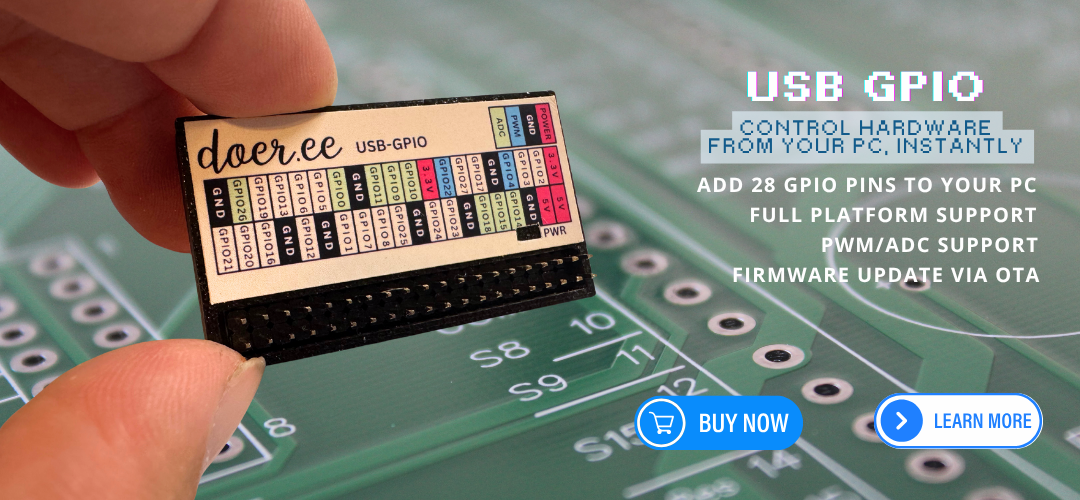
Full GPIO with pull-up/pull-down, hardware PWM on 8 pins, and analog input on 8 pins.
Python library and STM32 firmware are GPL-3.0 licensed and publicly available on GitHub.
Plug the board in via USB, install the Python library, and you're ready to control hardware from any Python script — on any computer. The board auto-detects over USB, so no manual port configuration is needed.
(On some systems you may need to use pip3 instead of pip, or specify the full path (e.g. python -m pip install DoerGPIO) if pip is not on your PATH.)
# Control an LED with DoerGPIO
import DoerGPIO as GPIO
import time

# Setup pin 17 as output
GPIO.setmode(GPIO.BCM)
GPIO.setup(17, GPIO.OUT)

# Blink 5 times
for _ in range(5):
    GPIO.output(17, GPIO.HIGH)
    time.sleep(0.5)
    GPIO.output(17, GPIO.LOW)
    time.sleep(0.5)

GPIO.cleanup()
All GPIO pins support configurable pull-up and pull-down resistors. Use any pin as a digital input or output.
Hardware PWM on 8 dedicated pins. Control servo motors, LED brightness, motor speed, and more.
4 · 9 · 10 · 16 · 18 · 20 · 22 · 26
Read analog sensors — potentiometers, light sensors, temperature sensors — on 8 ADC-capable pins.
0 · 9 · 10 · 11 · 14 · 15 · 18 · 26
Built around the STM32F070C6TX microcontroller, the Doer USB GPIO Board delivers reliable, real-time hardware control over standard USB. The firmware is written in C using STM32CubeIDE and fully open source.
| Microcontroller | STM32F070C6TX |
| USB Type | USB Full Speed (CDC) |
| GPIO Pins | 28 configurable pins |
| PWM Pins | 8 pins — 4, 9, 10, 16, 18, 20, 22, 26 |
| ADC Pins | 8 pins — 0, 9, 10, 11, 14, 15, 18, 26 |
| Pull Resistors | Configurable pull-up / pull-down on all pins |
| Platforms | Windows · macOS · Linux |
| Python Version | 3.9+ |
| Python Library | pip install DoerGPIO |
| Firmware Language | C (STM32CubeIDE) |
| License | GPL-3.0 |
Build hardware projects from your laptop without needing a Raspberry Pi. Control LEDs, motors, and sensors directly from Python.
Test hardware interactions from your development machine. Iterate faster by scripting GPIO changes directly in Python.
Teach embedded systems and GPIO concepts with familiar Python syntax. Works on any classroom computer over USB.
pip install DoerGPIO
Plug the Doer USB GPIO Board into any USB port. It auto-identifies itself — no manual serial port selection or driver installation required on Windows, macOS, or Linux.
import DoerGPIO as GPIO

GPIO.setmode(GPIO.BCM)

# Pin 17 as output
GPIO.setup(17, GPIO.OUT)
GPIO.output(17, GPIO.HIGH)

# Pin 22 as input with pull-up
GPIO.setup(22, GPIO.IN, pull_up_down=GPIO.PUD_UP)
value = GPIO.input(22)
print(f"Pin 22: {value}")

GPIO.cleanup()  # Reset all pins
pip install pyserial
Get the latest .bin firmware file and upload_fw.py from the GitHub releases page.
Make sure the board is unplugged, then run the script. When prompted, plug in the board and flashing will begin automatically. If the board is already connected when the script starts, it will ask you to unplug it first.
python3 upload_fw.py DoerGPIO_FW.bin
pip install DoerGPIO in your terminal. Python 3.9 or higher is required. The library auto-detects the board over USB, so no manual port selection is needed.
Control hardware from any computer. One USB cable. Pure Python.